
Open-sourcing flow
The Claude Code skills I've used on 27 projects to plan before building and keep the design intact across sessions.

I've been building with AI coding agents exclusively for the last year, and I kept running into the same two problems.
Small projects would end up with every bell and whistle the agent thought would be good. I'd ask for something simple and get a lot more than I asked for.
Large projects had the opposite problem. They'd pile up tech debt, or a bad design decision made early on would force a lot of refactoring later.
The agent writes good code. What it doesn't do on its own is keep track of the design. Each session starts fresh, so it doesn't know what we decided last week, what's out of scope, or which approach we already tried and dropped.
So I wrote a set of Claude Code skills to fix that, and I've used them on 27 projects since - client work, internal products, a couple of games. My team has been using them too. They help create well architected systems, even when the systems are large and complicated.
Today I'm open-sourcing them. The plugin is called flow.
Plan before building
The first three skills are for the planning. Before any code gets written, they work through the requirements, the MVP scope, and the architecture with you, one phase at a time. They stop after each phase so you can review and push back.
A few things they do that help with the small-project problem:
- Scope is something you decide. Anything not in the MVP is written down as not in the MVP.
- Technology choices stay marked
PROPOSEDuntil you confirm them. - Bigger decisions get an ADR, including the options you didn't pick.
- If the brief is thin, they tell you instead of making up acceptance criteria.
None of them estimate time or cost.
Keeping the design across sessions
The large-project problem is about what happens after the plan. Over hundreds of sessions, decisions get lost.
The fix is pretty simple. Every session starts by reading a file called NEXT_SESSION.md, and every session ends by rewriting it.
That file only holds the current state - what's next, what's blocked, which decisions are waiting on a person, which branch and PR. Longer-term knowledge goes in a handbook, and the requirements and designs have their own files.
The skill handles the start and the end of the session. The work in between is just normal engineering.
After each session you run /clear. If the next session can see the previous one's context, it'll work from that instead of the file, and you won't notice the file is out of date until someone else picks it up. Clearing makes sure the file actually has what the next session needs.
The five skills
   new project               existing codebase
        │                           │
 /flow:create-spec          /flow:analyze-fit
        └────────────┬──────────────┘
                     ▼
          /flow:create-blueprint
                     ▼
          /flow:create-flywheel     (once per project)
                     ▼
          /flow:turn-flywheel       (every session)
create-spec turns an idea or a project brief into requirements, architecture docs and ADRs.
analyze-fit does the same for a feature on an existing codebase. It reads the code first, and "don't build this" is one of the possible answers. A lot of my runs ended there.
create-blueprint turns the requirements into MVP scope, epics, stories, designs and a build order.
create-flywheel sets up the process in the project - requirement tables with a status column, STATUS.md, the session files, a handbook, and the session rules in AGENTS.md.
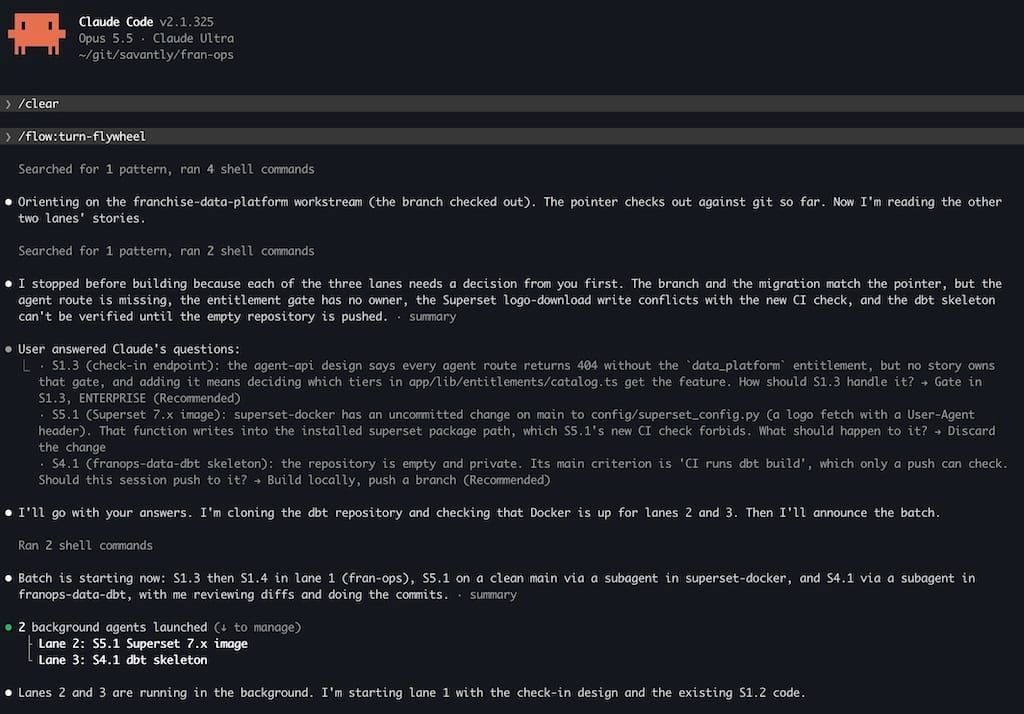
turn-flywheel is the one you use day to day. Run it at the start of a session, and it closes the session on its own when the work is done.
You don't have to use all five.
What changed along the way
The plugin is on version 1.10. Almost every version came from a project where something went wrong. A few examples:
A blocker sat in the session file for eight sessions in a row. An early version told the agent that things like dashboards and environment variables couldn't be checked from the terminal, so each session copied it forward. The answer was already there - a bot comment on the branch, and the provider's CLI. Now the agent tries to check before it hands something to a person.
On one project, every tracked document grew 10 to 75 times in 23 days. The handbook had 5,483 lines added and 86 removed over 143 sessions. One requirement row was over 21,000 characters. So now each document has a size limit, checked by a test, and adding text means removing some. Knowledge files get corrected in place. Only decision records keep a dated history.
I used to write a history file for every story. Nobody read it, and most of it repeated what was already in STATUS, the design doc, and the PR. It's gone. Git covers most of the history. The two things it can't cover are options you rejected and what you didn't test. Rejected options go in the design doc with a date, where the next session will see them. What wasn't tested goes in the PR.
The first version always stopped to ask which story to work on next, even when there was only one choice. Now it just starts on it. It still stops when there's a real decision, and gives you two or three options with a recommendation. The options go at the end of the message, since that's what's still on screen in a terminal.
The commit messages explain the reason for each change, if you want the full history.
Working as a team
Flow started on solo projects, and the session file was the first thing that broke when my team started using it. It gets rewritten at the end of every session, so two people sharing one file means merge conflicts.
Now each workstream has its own session file, and a root NEXT_SESSION.md lists them, one line each.
Those files are committed to the repo, not gitignored. They hold the decisions waiting on a person, and someone picking up your work (vacation, review, handoff) needs to see them.
How the docs are written
Every file flow writes follows the main rules of Simplified Technical English, which comes from aerospace maintenance manuals. Short sentences, one topic each, active voice, and the same word for the same thing every time.
Requirements get read a long time after they're written, by people who weren't part of the conversation, and more and more by agents. A synonym in a spec looks like a different requirement. A passive sentence doesn't say who's responsible.
This only applies to the files it writes. Talking to the agent works like normal.
What's next
The newer versions add a loop mode (/flow:turn-flywheel loop), so a session can run without anyone at the keyboard. Each turn ends with a small block a script can read - continue, decision, or done - and it only stops for a person when there's a real decision. As of today a session can also work on several independent stories at once, as long as they don't touch the same files.
Try it
/plugin marketplace add savantly-net/claude-plugins
/plugin install flow@savantly
A good place to start is /flow:analyze-fit, run from inside a repo, on a feature you've been thinking about. The README has the full pipeline, and a settings snippet that gives everyone on a project the skills when they clone it.
It's Apache-2.0. Let me know where it breaks - issues and PRs are open at github.com/savantly-net/claude-plugins.