
Flywheel-Driven Development

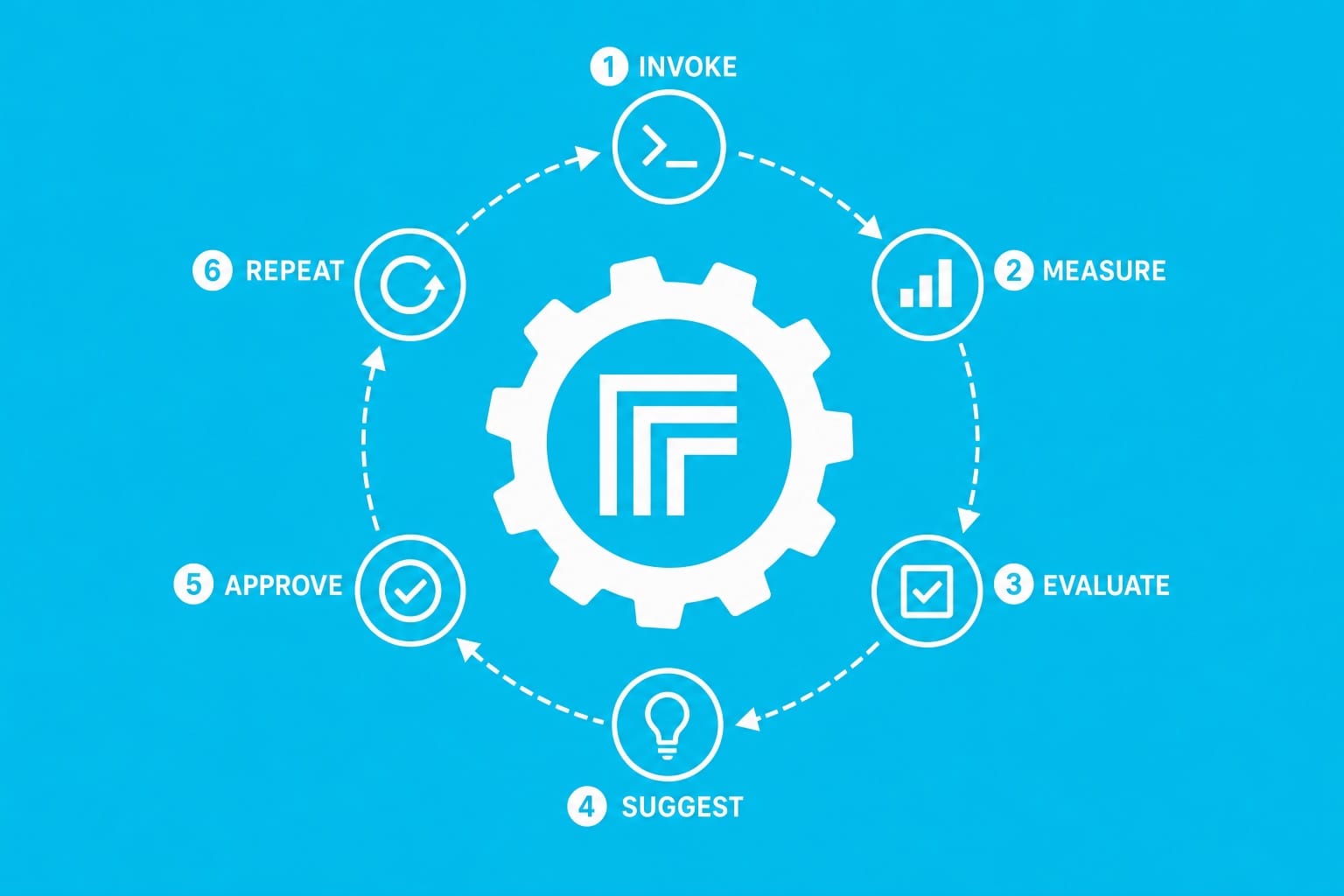
The Core Idea
Every development task has an iteration loop: change something, run it, look at the output, decide what to change next. The loop is where time goes. Not in the thinking, not in the typing — in the waiting, the context-switching, the "let me run that again and see."
A flywheel compresses that loop into a single automated cycle: invoke, measure, evaluate, suggest, approve, repeat.

What a Development Flywheel Looks Like
- Instrument the app. Log the telemetry that matters for the thing you're tuning — metrics, probabilistic outputs, latency, accuracy scores, token counts, whatever the business logic cares about.
- Write a script to exercise the core logic. Not a unit test. A script that invokes the real process end-to-end and collects the data. This is your baseline generator and your measurement tool in one.
- Collect a baseline. Run the script, capture the output. This is what "before" looks like.
- Evaluate with an LLM. Feed the collected data to an LLM and ask it to suggest a single, surgical change — one thing, scoped tightly, with a clear rationale.
- Human approval gate. The suggestion is presented. You approve it if the logic is sound. You reject it if it isn't. The human stays in the loop but doesn't do the grunt work.
- Apply, re-run, measure the delta. The change is made, the script runs again, and the new output is compared to the baseline. Did it get better? By how much? What's the next lever to pull?
- Loop.
Why "Flywheel"
A flywheel stores rotational energy. Each push adds momentum. The first rotation is the hardest — you're writing the instrumentation, building the script, wiring up the evaluation. But once the flywheel is spinning, each iteration costs almost nothing. You're not re-reading logs. You're not manually diffing output. You're not guessing what to try next.
The flywheel does the mechanical work. You make the judgment calls.
Walkthrough: Tuning a Chat Pipeline with an Agent Network
Let's make this concrete. You're building a chat application where user input passes through a network of agents — an orchestrator that routes to specialized agents for different tasks. The pipeline looks like this:
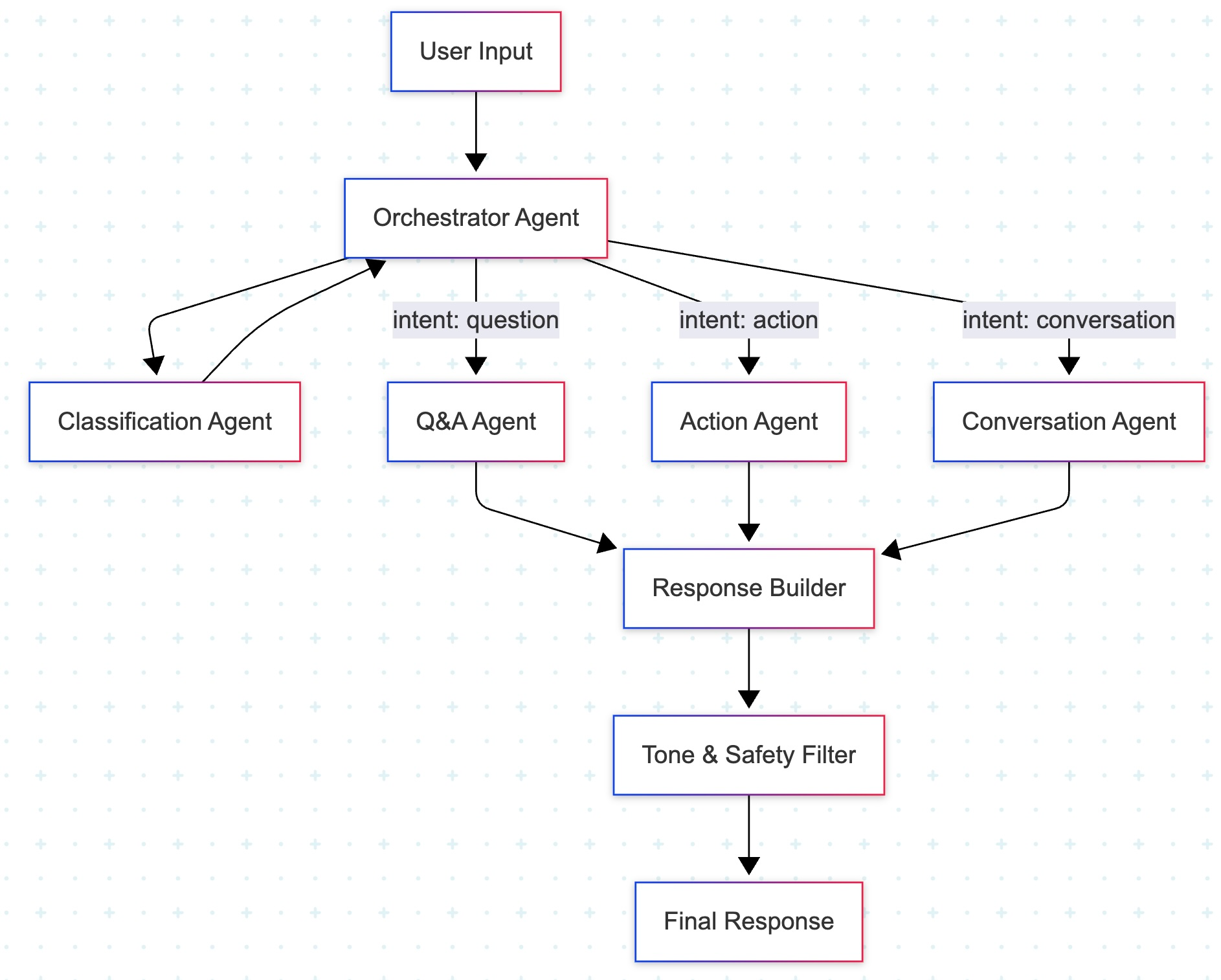
The problem: users are reporting that the bot misroutes requests. "Cancel my subscription" gets classified as a question and routed to the Q&A agent, which gives an informational answer instead of triggering the cancellation action. The classification agent is drifting.
Step 1: Instrument
You add telemetry to each agent in the pipeline. Every LLM call logs: the input it received, the output it produced, the model used, token counts, latency, and a call-site tag identifying which agent made the call.
Step 2: Write the script
You create a flywheel script. It takes a scenario file as input — a JSON file containing a sequence of user inputs and observation hints (what you expect to see):
{
  "name": "intent-routing",
  "description": "Verify action intents route to the Action Agent",
  "turns": [
    {
      "input": "Cancel my subscription",
      "expect": { "route": "action", "agent": "Action Agent" }
    },
    {
      "input": "How do I cancel my subscription?",
      "expect": { "route": "question", "agent": "Q&A Agent" }
    },
    {
      "input": "I want to upgrade to the pro plan",
      "expect": { "route": "action", "agent": "Action Agent" }
    },
    {
      "input": "What's the difference between pro and basic?",
      "expect": { "route": "question", "agent": "Q&A Agent" }
    }
  ]
}
The script seeds the database with test state, runs each turn through the full pipeline, and collects the output into structured files:
- turns.jsonl — one result per turn: the route chosen, which agent handled it, the response text
- traces.jsonl — every LLM call in the pipeline: full prompt, response, tokens, cost, call-site tag
- summary.json — the scoreboard: correct routes, misroutes, token usage, cost, wall-clock time
- report.md — human-readable per-turn cards showing what happened at each step
Step 3: Baseline
Run the script. The summary shows:
{
  "correctRoutes": 2,
  "misroutes": 2,
  "misrouteDetails": [
    { "input": "Cancel my subscription", "expected": "action", "got": "question" },
    { "input": "I want to upgrade to the pro plan", "expected": "action", "got": "question" }
  ],
  "llmCalls": { "classifier": 4, "qa_agent": 3, "action_agent": 1, "response_builder": 4 },
  "totalTokens": 8420,
  "costUsd": 0.003,
  "wallClockSec": 12.4
}
Two out of four misrouted. That's the baseline.
Step 4: Evaluate
The agent reads the traces for the misrouted turns. It sees that the classification agent's prompt says:
"Classify the user's message as one of: question, action, conversation."
No examples. No definition of what "action" means. The classifier is guessing based on surface-level phrasing — "Cancel my subscription" reads like a statement, so it defaults to "question."
The agent diagnoses the root cause: the classification prompt lacks intent definitions and few-shot examples for action intents.
Step 5: Suggest
The agent proposes a single, surgical change to the classification prompt:
- Classify the user's message as one of: question, action, conversation.
+ Classify the user's message as one of:
+ - question: the user is asking for information
+ - action: the user wants to change something (cancel, upgrade, modify, create, delete)
+ - conversation: the user is making small talk or greeting
+
+ Examples:
+ - "Cancel my subscription" → action
+ - "How do I cancel?" → question
+ - "I want to upgrade" → action
+ - "Hey, how's it going?" → conversation
Step 6: Approve and re-run
You read the suggestion. The logic is sound — the classifier needed grounding. You approve.
The change is applied. The script runs again. The new summary:
{
  "correctRoutes": 4,
  "misroutes": 0,
  "llmCalls": { "classifier": 4, "qa_agent": 2, "action_agent": 2, "response_builder": 4 },
  "totalTokens": 9180,
  "costUsd": 0.004,
  "wallClockSec": 13.1
}
4/4 correct. Token cost went up slightly (longer prompt), but accuracy went from 50% to 100%. The agent logs the finding:
Hypothesis: Classification prompt lacks intent definitions, causing action intents to misroute.
Fix: Added intent definitions and few-shot examples to classifier prompt.
Before: 2/4 correct (50%)
After: 4/4 correct (100%)
Lesson: Classifiers need grounding definitions, not just category labels.
Step 7: Next iteration
The flywheel asks: keep going? You add more edge-case scenarios. The next iteration catches a new failure mode — "Please stop charging my card" routes to conversation. The flywheel suggests adding a "frustration + account action" example. Approve, re-run, measure. The wheel turns.
This Is an Agent Skill
The whole cycle can be encoded as a single AI coding agent skill. You invoke the skill. It orchestrates the loop:
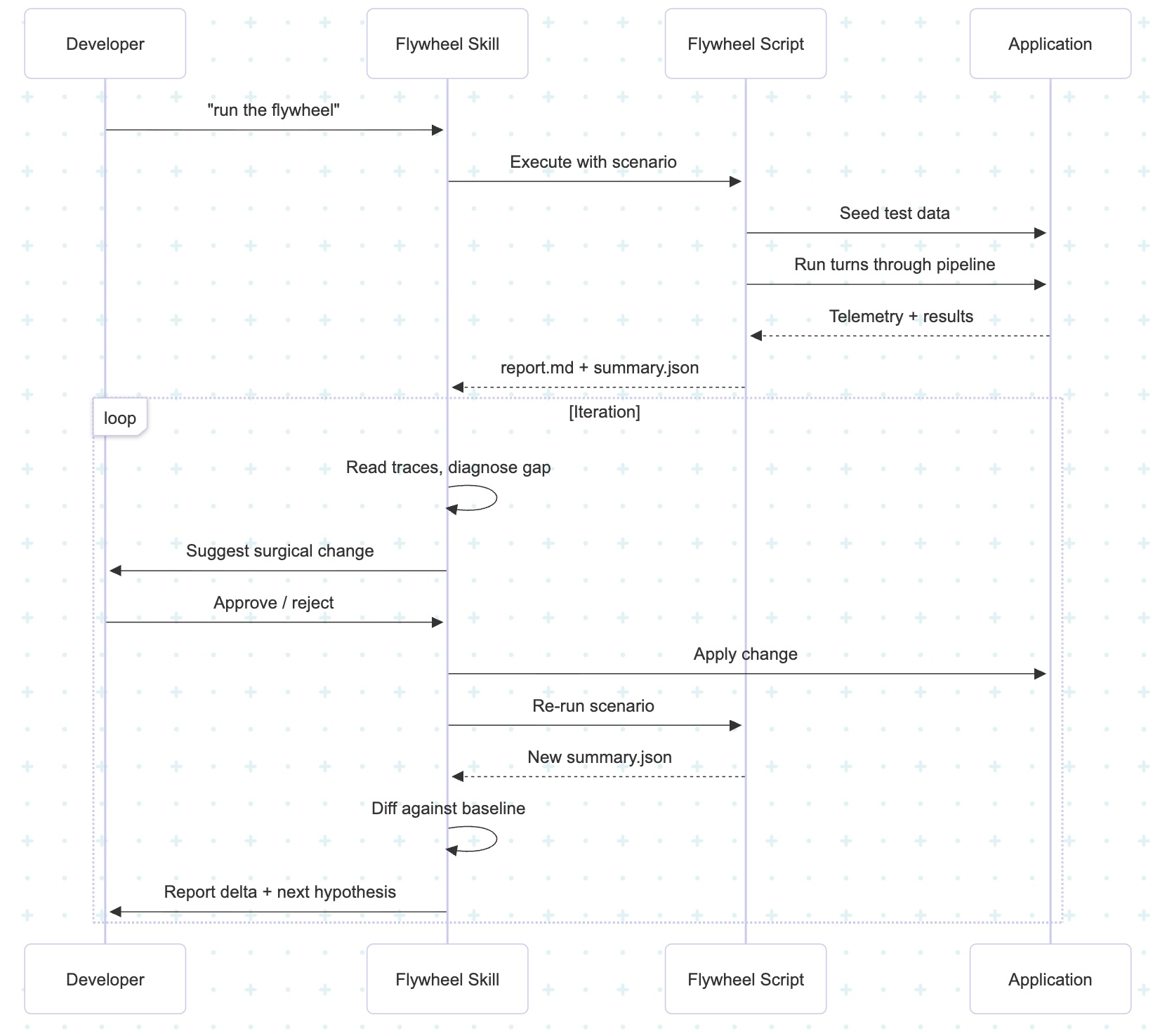
The skill is bespoke to your app. That's the point. You're not using a generic optimization tool — you're building a flywheel tuned to your specific business logic, your specific telemetry, your specific definition of "better."
Pseudo-Skill: The Flywheel Template
Here's what the skill definition looks like in practice. This is the operating manual an AI coding agent follows when you say "run the flywheel":
# flywheel/SKILL.md (pseudo-skill)

name: flywheel
trigger: "run the flywheel", "iterate on this", "test this change"

## Prerequisites
- A flywheel script exists at `scripts/flywheel/run.ts` (or equivalent)
- At least one scenario file exists in `tests/flywheel/scenarios/`
- The app is instrumented to log telemetry (traces, metrics, outputs)

## The Loop

1. HYPOTHESIS
   State what should change and which metric should move.

2. SCENARIO
   Pick an existing scenario or author a new one targeting the hypothesis.

3. BASELINE
   Run: `pnpm flywheel --scenario <name>`
   Save the summary.json path as the baseline.

4. READ
   Analyze report.md (human-readable) and summary.json (machine-diffable).
   Read traces.jsonl for the specific LLM calls involved in the failure.

5. DIAGNOSE
   Root-cause the gap. Cite file:line evidence.
   Common patterns:
   - Prompt missing grounding definitions → add examples
   - Wrong data passed to agent → trace the context builder
   - Output schema too loose → tighten validation

6. FIX
   Apply the smallest targeted change that addresses the root cause.
   One change per iteration. No drive-by refactors.

7. VERIFY
   Re-run the same scenario. Diff new summary.json against baseline.
   Metric moved in expected direction AND no regression → proceed.
   Regression detected → revert and re-diagnose.

8. LOG
   Append to findings.md:
   - Hypothesis / Scenario / Before / Diagnosis / Fix / After / Lesson

9. DECIDE
   - Metric improved, no regression → ship it
   - Metric improved, new regression → iterate
   - Metric unchanged → pivot hypothesis
   - Ask: keep going?

## Anti-patterns
- Changing multiple things at once (can't attribute the delta)
- Skipping the baseline (can't measure improvement)
- Fixing symptoms instead of root causes
- Optimizing a metric that doesn't map to user-visible quality
Look for my next blog post to provide a skill that guides you through the development of your own Flywheel skill. Skills all the way down!
Where This Applies
- Agent pipelines. Instrument routing, classification, and response quality across your agent network. The walkthrough above is a real pattern.
- Prompt engineering. Instrument the LLM call, log output quality, let the flywheel suggest prompt tweaks one at a time.
- Performance tuning. Instrument latency and throughput, let the flywheel suggest config or code changes, measure the delta.
- Data pipeline accuracy. Instrument transformation outputs, let the flywheel suggest changes to parsing or mapping logic.
- Search relevance. Instrument result rankings, let the flywheel suggest scoring adjustments.
- Any process with measurable output and tunable parameters.
The Expensive Part of Development
The expensive part of development isn't writing code. It's the iteration cycle:
- Make a change
- Wait for it to build/deploy/run
- Look at the output
- Think about what to try next
- Go to 1
Steps 2-4 are where hours disappear. The flywheel automates 2-4 and compresses the wall-clock time of each iteration from minutes (or hours) to seconds.
You still do step 1 — or rather, you approve step 1. The flywheel proposes. You decide.
What This Isn't
- Not auto-pilot. The human approves every change. The flywheel suggests; you decide.
- Not a test suite. Tests assert correctness. The flywheel optimizes toward "better" on a continuous scale.
- Not prompt-and-pray. Each iteration is measured, compared, and scoped. You see the delta. You know what changed and why.
Closing Thought
The developers who ship fastest aren't the ones who type fastest. They're the ones who iterate fastest. A flywheel doesn't make you smarter — it makes the gap between "I wonder if this would work" and "here's the data" almost zero.
Build the flywheel. Let it spin. Save your judgment for the decisions that matter.